ProductivityOffline Translator for Windows

Offline translator for Windows

Translate text, subtitles and Word documents on your PC with language packs that work without the internet. Nothing you write is sent anywhere.

  • Free in the Microsoft Store
  • No account needed
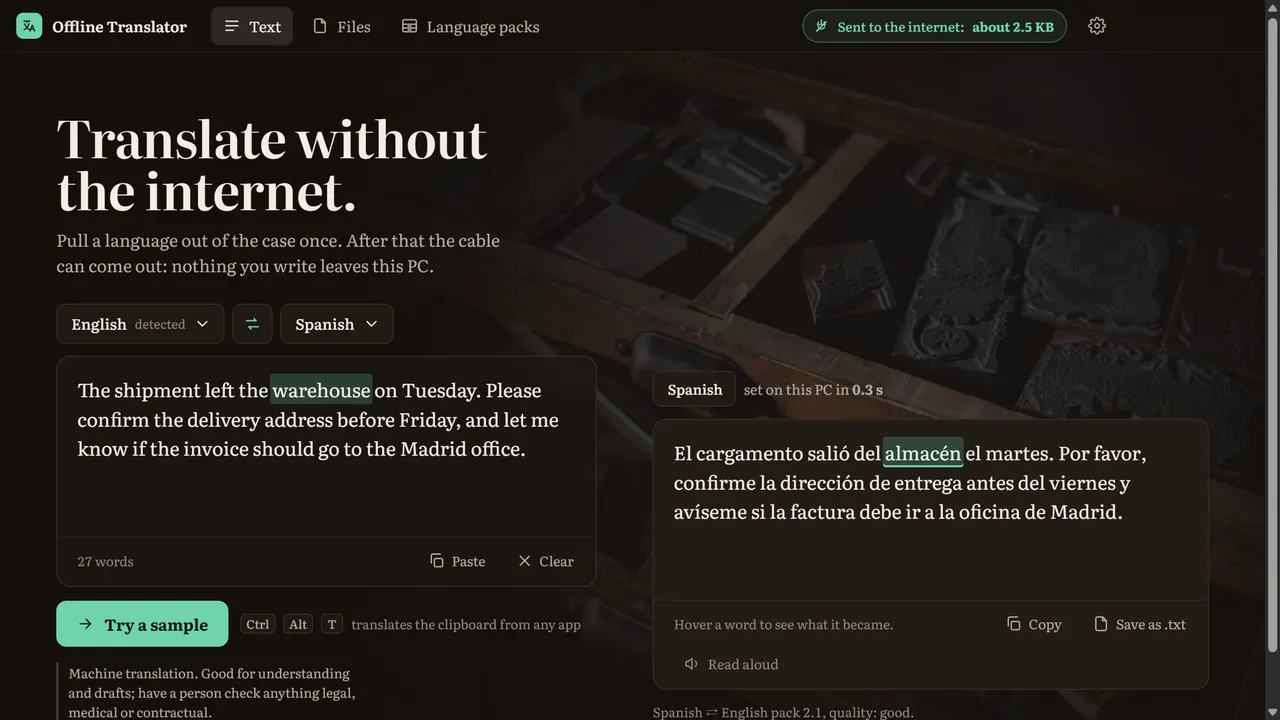
Offline Translator with an English sentence on the left and its Spanish translation on the right; hovering "almacén" lights up "warehouse".

Features

What it does

Offline Translator with an English sentence on the left and its Spanish translation on the right; hovering "almacén" lights up "warehouse".

Translate as you type, offline

Type or paste and the translation appears on the right as you write. Once a language is on your PC, the network cable can come out.

  • See what every word became

    Hover any word on either side and its counterpart lights up. Copy the result, save it as text, or have Windows read it aloud.

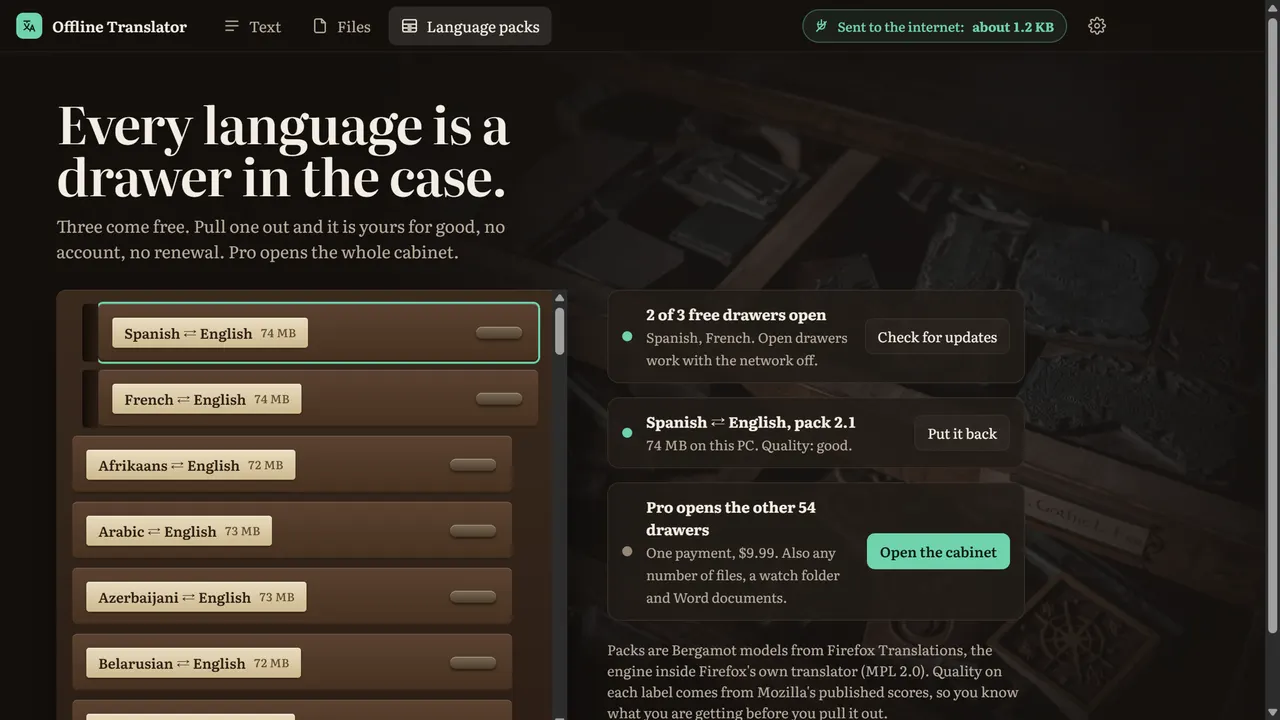
The language packs drawn as a type cabinet: Spanish and French pulled out, the other languages closed.

Languages are drawers you pull out once

57 languages from Firefox Translations, the models inside Firefox, by Mozilla. Each label shows its size and a quality rating from Mozilla's own tests before you download it.

  • From any app

    Copy text anywhere and a small card offers the translation beside the pointer, or press Ctrl+Alt+T. Right-click a subtitle or text file in File Explorer to translate it.

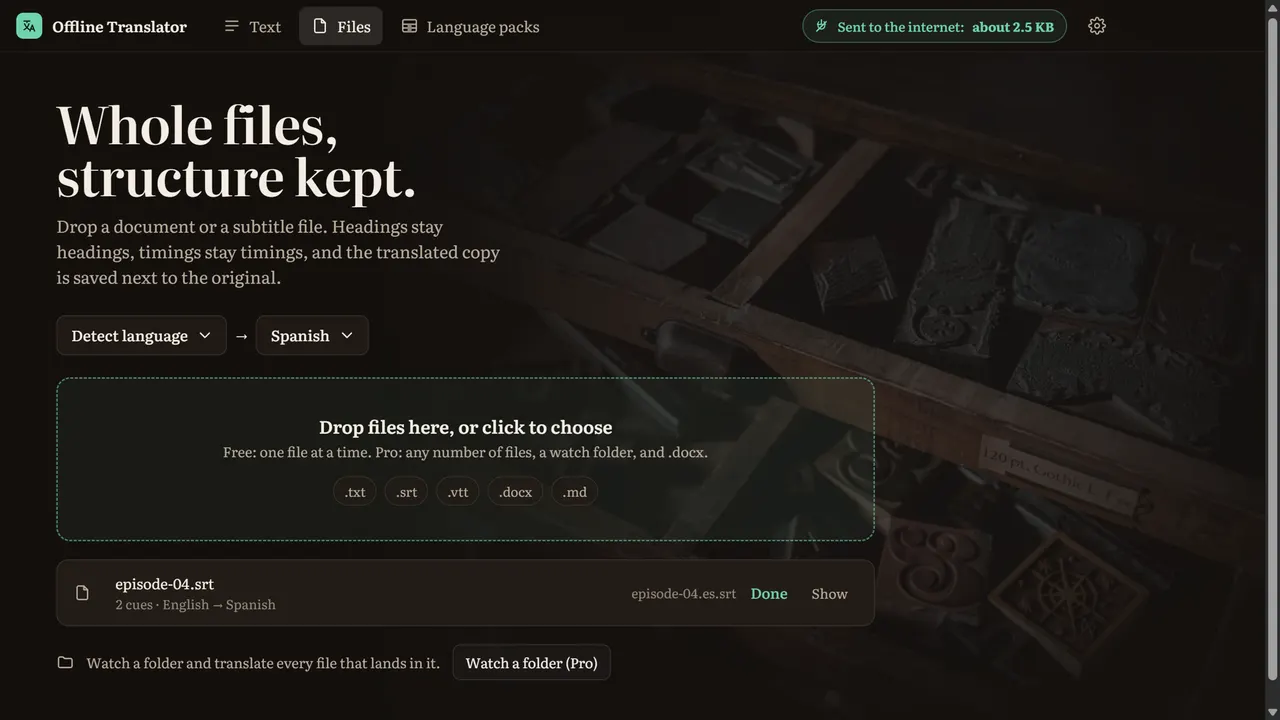
A subtitle file translated from English to Spanish and saved next to the original as episode-04.es.srt.

Subtitles and documents keep their shape

SRT and VTT keep every timing, Markdown keeps its headings and links, and Pro translates Word documents with their bold, italics and fonts in place. The copy is saved next to the original.

  • A counter for what leaves your PC

    The title bar shows what the app has sent to the internet. Downloading a pack is the only traffic; nothing you write is ever sent.

How it works

Three steps, no setup

  1. Pull out a language

    A one-time download, 43 to 137 MB, from our own server, checked against its signed fingerprint.

  2. Type, paste or drop a file

    Text, .txt, .md, .srt, .vtt, and .docx with Pro.

  3. Use it anywhere

    Copy, save, read aloud, or translate straight from another app.

Pricing

Free to use, Pro when you need more

Get it free from the Microsoft Store. Pro is a one-time purchase on this website.

Free

$0

  • Text translation as you type, with word highlighting
  • Three languages of your choice, each both ways with English
  • Up to 5 .txt, .md, .srt or .vtt files at a time
  • Pop-up on copy and Ctrl+Alt+T
  • Read aloud with Windows voices
  • Works offline once a language is downloaded
Get it from Microsoft

Pro: everything in Free, plus

$9.99 one-time

  • Every language, 57 in all
  • Any number of files at once
  • A watch folder that translates new files
  • Word documents with formatting kept
Buy Pro

Buy Pro here and paste the key into the app's Settings. It works on up to 3 PCs, with a 14-day refund, no questions asked.

What's new

Version 1.4.0

  • After you've used the app a few times, one quiet line under a result offers to open the Microsoft Store's rating box. It asks once, at most twice, never interrupts your work, and you can simply carry on.
  • Settings › Rate in the Microsoft Store now opens the rating box directly.

Version 1.3.0

  • When a language pack can't download, the app now says why: no internet, not enough disk space, or a problem on our server. It checks for free space before it starts.
  • Copying a password no longer brings up the translate card.
  • If Pro ends while a folder is being watched, watching stops and the app tells you.
  • Settings has a new "Report a problem" form: tell us what went wrong, and leave your email if you want an answer.
  • You can turn on crash reports in Settings to help us fix problems faster. They are off unless you turn them on, and file paths, email addresses and your user name are removed before anything is sent.

Version 1.2.0

  • The Pro details and wording now stay current from our website, without waiting for an app update.

FAQ

Questions

Something not answered here? Email us and you'll get a reply.

[email protected]
Can I translate on Windows without the internet?

Yes. Download a language once in Offline Translator (Language packs), then translate with Wi-Fi off. Text, subtitles and documents are translated on your PC.

Is it free?

Yes, for typed text, three languages of your choice and up to 5 files at a time. Pro adds every language, any number of files, a watch folder and Word documents for $9.99 once.

Which languages are there?

57, each both ways with English, including Spanish, French, German, Portuguese, Italian, Polish, Russian, Ukrainian, Japanese, Korean, Simplified and Traditional Chinese, Arabic, Hindi, Turkish and Vietnamese. Two languages other than English translate through English.

How good is the translation?

The models are Mozilla's Firefox Translations, the same as in Firefox. Each language shows a rating (good, fair or basic) from Mozilla's published test scores. It is machine translation: good for understanding and drafts; have a person check anything legal, medical or contractual.

Can it translate subtitles?

Yes. Drop an SRT or VTT file: every cue keeps its number and timing, and the translated copy is saved next to the original, for example episode-04.es.srt.

Can it translate a Word document?

With Pro. Each paragraph is translated and every run of text keeps its formatting. The translated copy is saved next to the original as a new .docx.

Is what I type sent anywhere?

No. Text and files are translated on your PC. The only traffic is downloading the language packs you choose, from our own server, and activating Pro if you buy it. A counter in the title bar shows what the app has sent.

Does it replace the old Microsoft Translator app?

Microsoft removed its Translator app from the Store in 2021. Offline Translator does the same everyday job, typed text and files, with downloadable languages that work offline.

How do I translate text from another app?

Copy it: a small card offers the translation beside the pointer (you can turn this off in Settings). Or copy and press Ctrl+Alt+T. Both work while Offline Translator is open or minimized.

What does Pro cost?

$9.99, once. Buy it on this website and paste the license key into Settings. It works on up to 3 PCs, and there is a 14-day refund, no questions asked.

Get Offline Translator

Translate text, subtitles and Word documents on your PC with language packs that work without the internet. Nothing you write is sent anywhere.

Machine translation. Good for understanding and drafts; have a person check anything legal, medical or contractual.